Tell someone before you go. Even where there's no signal.
MeshSafe is a free check-in service for bushwalkers and boaters around the Illawarra. It runs over long-range mesh radio — no mobile coverage, no internet, no SIM card needed. Register a trip, check in as you go, and if you don't come back on time, the person you nominated gets an email with your last known position.
$0/month · no account · no app subscriptions · runs on a solar-friendly Raspberry Pi
What on earth is a "mesh radio"?
Your phone normally needs a tower to send a message. In the bush and offshore, there's often no tower. MeshCore is a community network of little battery-powered radios that pass messages along for each other — hilltop to hilltop — until they reach their destination.
You carry a card-sized radio (about $100, lasts days on a charge). It talks to your phone over Bluetooth.
Your message hops between volunteer relay stations on ridgelines and rooftops across the Illawarra and beyond — no towers, no internet, no fees.
Messages are encrypted, and your radio can attach your GPS position — which is how MeshSafe knows where you last were.
Curious about the network itself? The volunteer community that builds and runs it: nswmesh.au
Where the mesh can hear you
Every relay below is one the MeshSafe station has actually heard — real observed network, not a wish list. Shaded circles are an indicative radius around each relay; genuine coverage depends heavily on terrain and can reach much further from a good vantage point (or vanish in a gully). The only real test: post test on #meshsafe from where you'll be walking.
Loading live relay data from the station…
How MeshSafe works
Your details live on this website. Out in the field, everything happens on one public radio channel — #meshsafe — and with one button: the advert.
Register
Name, mobile, and who to email if you're overdue — entered on the website, never over the radio. Press Advert once to link your radio to your profile.
Registered ✓ Radio “🐐LUX” linked.Log a trip
Post your return time on the channel. MeshSafe asks for an advert to confirm it's really your radio — which also logs your starting position.
out 5pm Mt Keira loop @Karl send an advert 📡 to confirm & start.Check in
When MeshSafe pings you on the channel, send a flood-routed advert from the app: tap the ((·)) signal icon → Advert → Flood Routed. Proves you're OK and logs your GPS. (The tracker's button double-press sends a short-range advert that usually won't reach us — use the app.)
Advert received ✓ Position logged.Escalation
Miss your return time and stay silent for 30 more minutes? Your contact gets an email with your last known position and a map link. Post back when you're home and they get the all-clear.
back @Karl glad you're back safe. Trip closed. 👍On the radio: post out 5pm on #meshsafe, confirm with an advert. On the website: pick your walk, set a return time, done — enter the same email you registered your radio with and the trip is linked to your radio automatically (check-ins and breadcrumbs work as normal), and you get an "I'm back" email link as an extra way to close it. No radio at all? The website still works: MeshSafe watches your return time and emails your contact if you go overdue — just with no way to hear from you in the field.
Sarah — has a radio
linked her radio to her email once, weeks ago📱 On the walks page, picks Wodi Wodi Track (typically ~1 h), sets back by 2:00 pm, types her email. Because it's the same email her radio is linked to, the trip attaches to her radio automatically.
✉️ "Your walk is registered." Her "I'm back" link, saved for later.
📡 Trailhead ritual: posts test on #meshsafe → "heard you — 2 hops ✓". Coverage confirmed for real, not just predicted.
📡 At the lookout: ((·)) → Advert → Flood Routed in the app — a position breadcrumb lands on her trip. Ten seconds, phone back in pocket.
📱 Back at the car, clicks "I'm back safe" in the email. Trip closed. (No phone signal? Posting back on #meshsafe does the same job.)
radio + website — breadcrumbs, check-ins, two ways to close ✓
Tom — no radio
first time, nothing but a phone at home📱 Picks Mt Keira Ring Track (~1 h), sets back by 1:00 pm. His email is new, so the form asks for his name, mobile, and his sister's email as emergency contact.
✉️ Tom gets his "I'm back" link; his sister gets a heads-up so a future alert is never mistaken for spam.
🌳 While he walks, MeshSafe can't hear him — no radio, no breadcrumbs. Only the return-time clock is running.
✉️ Tom forgot to click. His sister gets the overdue email: his mobile, the walk, when he was due — and an honest "there's probably nothing wrong."
📞 She calls — he's at the pub. He clicks his link; the all-clear email goes to her automatically.
embarrassing on the couch — working exactly as designed ✓
Every command
Post these on the #meshsafe channel anytime. Not case-sensitive. Anything else you chat about on the channel during a trip quietly counts as a sign of life too.
| You post | What happens |
|---|---|
| test | Radio check, works for anyone: MeshSafe replies with how well it heard you (hops & signal). Do this at the trailhead. |
| out 5pm | Start a trip — back by 5pm today. Add a note and/or an inline ping override: out 5pm 1h mt keira loop. MeshSafe then asks for a confirming advert — the trip only starts when it arrives. Same-day times only. |
| (send an advert) | The check-in: in the app, tap ((·)) → Advert → Flood Routed. Confirms trip starts, answers reminder pings, and logs your GPS position every single time. (The tracker button's double-press is short-range only — don't rely on it.) |
| 30m / 1h / 2h | Change your reminder interval mid-trip. |
| extend 7pm | Push your return time out. Do this the moment you know you're running late. |
| status | Where you stand: trip state, deadline, last check-in, last position. |
| back | Trip over, you're safe. Also: home or done. If your contact was alerted, they automatically get the all-clear. |
| sos | Immediate alert email to your contact with your last known position — no waiting. If you can reach 000 yourself, always do that first. |
| help | A pocket version of this table. Profile changes (name, contact, pings) happen on this website, not over the radio. |
Know the limits — please read this once
MeshSafe is a nice-to-have — an extra layer on top of good trip planning, not a replacement for it. It's run by one volunteer on hobbyist radio equipment. It is genuinely useful, and it is genuinely not foolproof. Both are true.
It is not a distress beacon
A PLB (personal locator beacon) talks to satellites and alerts professional rescue services directly. MeshSafe emails a friend. For remote or solo trips, carry a PLB — around $300, no subscription, and it works anywhere on Earth.
Coverage has holes
Mesh radio needs a chain of relays between you and Port Kembla. Deep gullies, dense canopy and distance all break the chain. No coverage = your check-ins and SOS simply don't arrive. The escarpment and coast are decent; assume nothing further afield.
Nobody is watching a screen
Escalation is automatic software on a Raspberry Pi. If the power's out, the Pi's crashed, or the email service hiccups at the wrong moment, an alert can be late or lost. There is no staffed control room. The live status line at the top of this page shows the station's actual health — glance at it before you rely on us.
False alarms happen
If you forget to close your trip, your contact gets a scary email while you're eating chips on the couch. Brief the person you nominate: "overdue" usually means "out of coverage or forgot", and the email itself says so.
Also do the old-fashioned things: tell a person your route and return time face-to-face, check the weather, and log on with Marine Rescue NSW if you're heading out on the water — that's a professional service and it's also free.
FAQ
How much does it cost?
The service is free — no account, no subscription. Your only cost is the radio (≈ AU$100 once). It's run as a community project; if it ever gets busy enough to cost real money, that'll be a nice problem.
Does my phone need mobile signal?
Out on a trip: no — that's the whole point. Your phone talks to your radio over Bluetooth, and the radio talks to the mesh. Mobile signal, wifi and SIM cards are not involved anywhere between you and MeshSafe in the field.
You do need internet once, at home, to register on this website. The alert email to your contact is sent from the MeshSafe station in Port Kembla, which has its own internet.
What exactly does my emergency contact receive?
When you register, they get one heads-up email so a future alert isn't mistaken for spam. If you go overdue: an email with your name, mobile number, trip note, expected return time, when you were last heard from, your last known position, and one map link that draws your recent positions in order — so they can see which direction you were travelling and hand a search party a real track, plus each timestamped point separately. If you check in afterwards, they get an all-clear automatically.
How's my privacy?
Straight answer: #meshsafe is a public channel — your trip posts ("out 5pm mt keira", "back") are visible to anyone on it, like a community noticeboard. Your personal details (mobile, emergency contact) live only on this website and in the alert emails — never on the radio. Adverts, including your position when Share Location is on, are broadcast to the mesh by design; that's how mesh networks work, and it's what makes rescue-useful breadcrumbs possible. If broadcasting positions bothers you, leave Share Location off — the service still works, just without the map.
What's the battery life like?
The T1000-E idles for days-to-weeks. For a day walk, charge it the night before and don't think about it again. Your phone's battery matters more — the app doesn't need to stay open, but the radio holds messages for when you reconnect.
Can I use it for multi-day or overnight trips?
Not yet — trips currently need a same-day return time. For an overnighter, log each day as its own trip in the morning ("out 6pm Kanangra day 2"). Proper multi-day trips are on the wish list.
I'm a boater — anything different for me?
Same service, same commands. But please also log on with Marine Rescue NSW (VHF 16 / their app) — that's the real system for boats, staffed by professionals. MeshSafe is a bonus layer, and land-based relays mean coverage drops off as you get further offshore.
MeshSafe isn't answering me on #meshsafe. Help?
1) Check the channel is named exactly #meshsafe (with the hash, no spaces). 2) Post test — if there's no reply within a minute, the mesh probably can't hear you from where you are: move somewhere with a view towards the escarpment or coast and try again. 3) Check the app is on the Australia Mid preset. 4) During registration, remember the website needs a flood-routed advert (not Zero Hop) to spot your radio. Still stuck? There's a friendly local mesh community — search "Illawarra MeshCore" — who love a coverage puzzle.
Who runs this?
A local volunteer, on a Raspberry Pi and a rooftop antenna in Port Kembla, because it seemed like it should exist. It sits on top of the wider volunteer-built MeshCore network across the Illawarra — the relay stations that carry your messages are other people's hobby projects too.
The stations behind MeshSafe
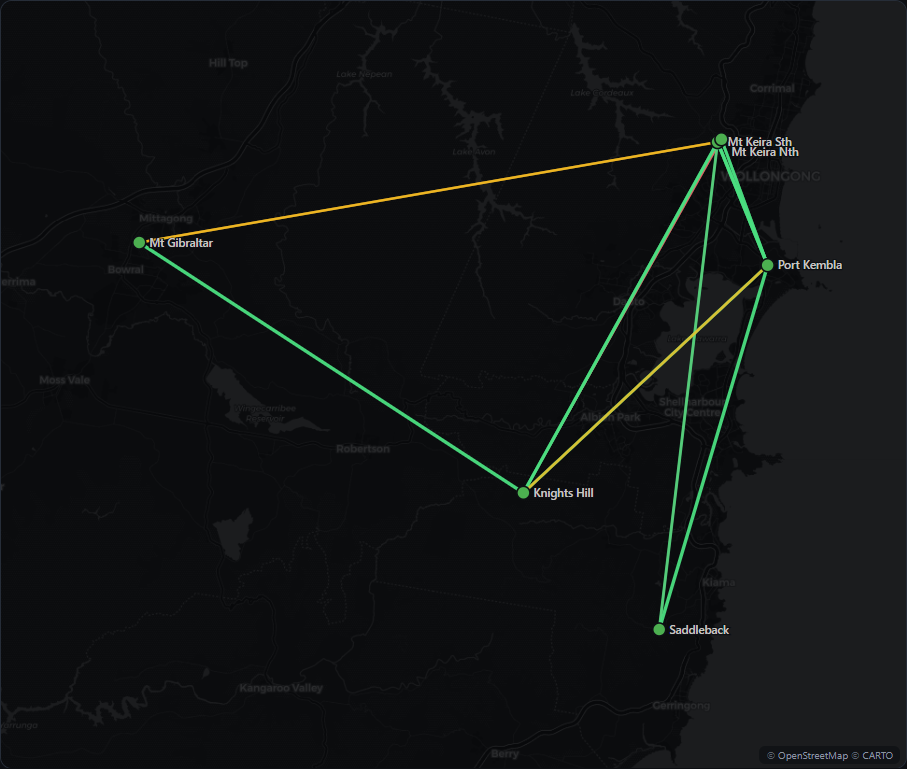
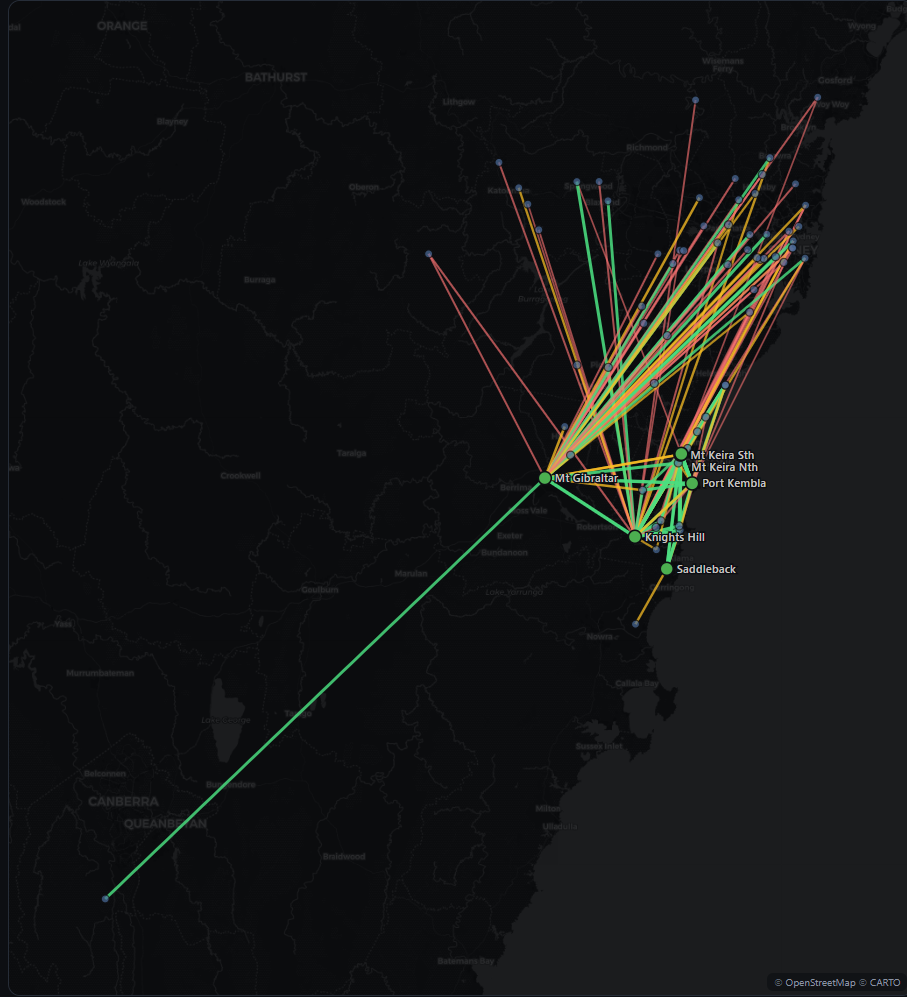
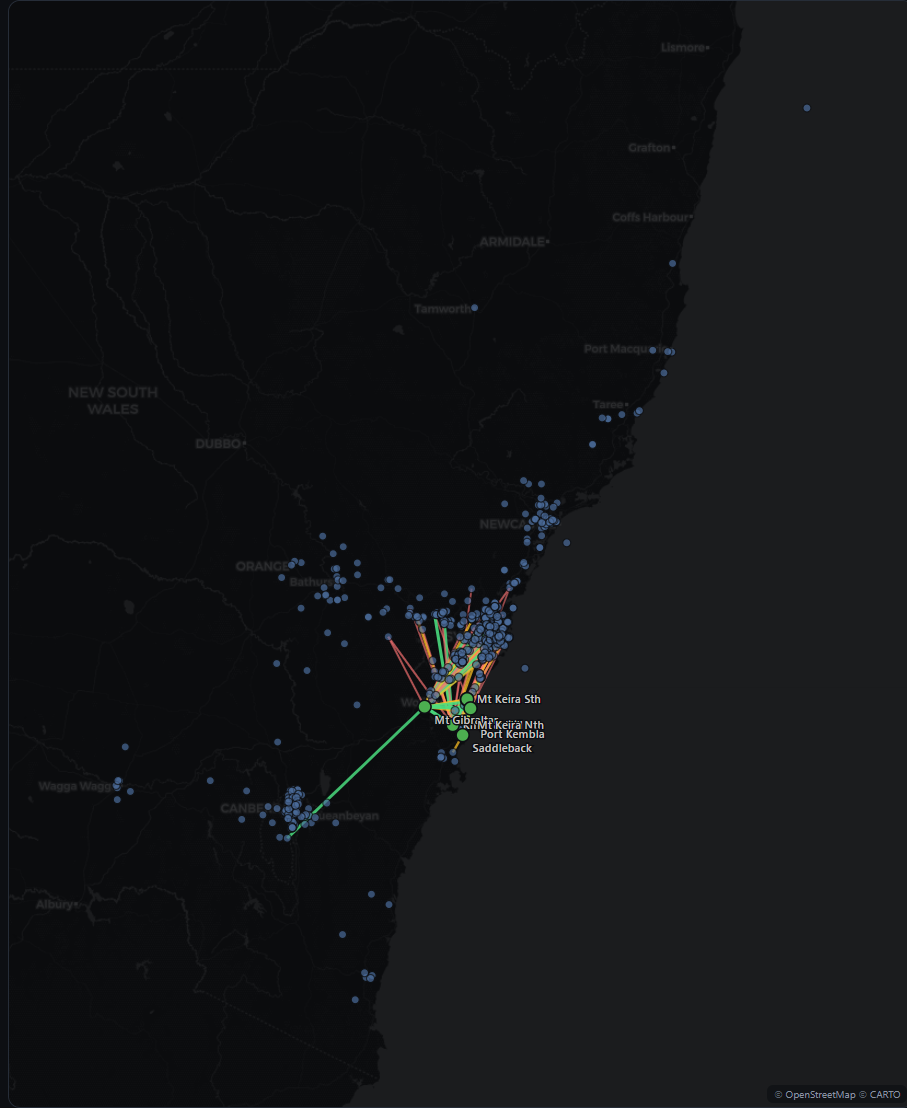
These five LUX stations are the small fleet I own and run myself, placed on high points around the Illawarra and monitored from a home server. But they're only our corner of something much bigger: hundreds of other repeaters — 900+ nodes across NSW — built and maintained by volunteers, each one extending the mesh a little further. The snapshots below show my fleet, the neighbours it talks to directly, and everything it has heard across that wider network.
Snapshots from the MeshSafe monitoring system · map tiles © OpenStreetMap © CARTO